



- Konu Yazar
- #1
Engineers gain faster, easier drive setup with Nidec’s Connect V3, offering step-by-step guidance, live tuning, and centralized support tools.
Commissioning servo drives is often a bottleneck in automation projects. With Connect V3, Nidec delivers a major update to its PC-based tool, offering guided setup, auto-discovery, and real-time diagnostics in one streamlined interface. Engineers can test axes, tune motion, and troubleshoot with built-in scopes and logic visualization. Combined with centralized resources at DriveSetup.com and integration with Machine Control Studio, Connect V3 makes commissioning and maintaining servo systems faster, simpler, and more reliable.
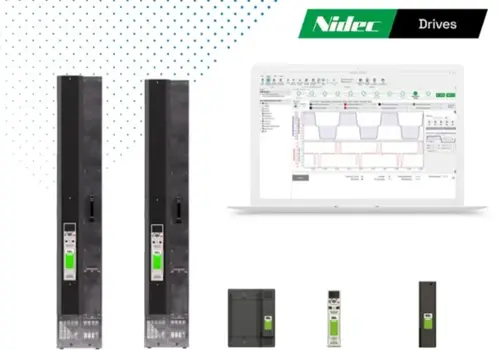
Connect V3 shows drive setup, tuning, and diagnostics in a single interface.
Connect V3 is Nidec’s updated PC software for setting up and maintaining servo drives like the Digitax HD series. The interface has been overhauled to make the software more intuitive, with step-by-step guides that help users through tasks such as motor selection, communication setup, and basic motion tests. The built-in diagnostic tools reduce the need to jump between different programs, helping teams catch issues earlier and keep systems running reliably.
Redesigned Interface and Setup Guidance
Connect V3 features a redesigned interface with guided steps for drive commissioning. Users can auto-discover drives over Ethernet, Serial, or Bluetooth without manual IP setup. EtherCAT systems are also supported, and TwinCAT users can bypass EoE configuration entirely.
Motor selection is handled through a dropdown list, and axis movement can be tested directly in the tool. Connect V3 also has built-in help prompts that can help reduce the need for reference manuals during setup, which gives integrators a straightforward format and minimizes unnecessary clicks, making it practical for both experienced users and those less familiar with the system.
Real-Time Tuning and Motion Analysis
Connect V3 features an integrated scope that allows users to monitor their system's behavior in real time during tuning. All key parameters, such as gains, motion profiles, and I/O status, are readily available on one screen, which helps reduce time spent jumping between menus. Visual tuning with live plots and adjustable sliders makes it easier to see step response and refine control settings with minimal trial and error.
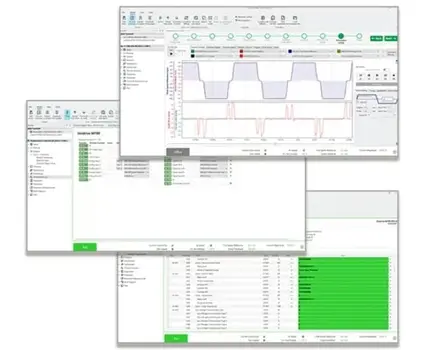
Connect V3 can provide real-time system tuning with a built-in scope and unified parameter view.
The logic diagram viewer provides a dynamic view of drive logic, including signal flow and I/O states, aiding in commissioning and troubleshooting. Drive parameter sets can also be backed up and restored quickly for use across multiple axes or machines.
Machine Control Studio Integration
While Connect focuses on setup and tuning, more complex control logic can be programmed using Nidec’s Machine Control Studio. This IEC 61131-3 compliant environment supports Structured Text, Ladder Diagram, and other standard automation languages. It also enables programming for onboard PLCs and integrated MCi modules and allows for Ethernet network data configuration.
Machine Control Studio enables IEC 61131-3-compliant programming for Nidec drives.
Nidec has provided helpful features like IntelliSense auto-completion to make writing and editing code faster, especially when juggling multiple logic blocks or repetitive functions. Support for both internal and open-source libraries gives engineers flexibility to build on proven code instead of starting from scratch. The software also has live watch windows, online variable monitoring, and the ability to make changes on the fly.
Centralized Support Resources
To support the Connect V3 launch, Nidec introduced DriveSetup.com, a centralized portal with all the software, documentation, and setup tools in one place. With Connect V3, users are provided with unified tools for drive setup, tuning, and diagnostics. Guided configuration, scope-based tuning, and logic visualization are also integrated. DriveSetup.com centralizes documentation and software downloads. The system supports consistent commissioning and maintenance workflows with minimal user input.
Commissioning servo drives is often a bottleneck in automation projects. With Connect V3, Nidec delivers a major update to its PC-based tool, offering guided setup, auto-discovery, and real-time diagnostics in one streamlined interface. Engineers can test axes, tune motion, and troubleshoot with built-in scopes and logic visualization. Combined with centralized resources at DriveSetup.com and integration with Machine Control Studio, Connect V3 makes commissioning and maintaining servo systems faster, simpler, and more reliable.
Connect V3 shows drive setup, tuning, and diagnostics in a single interface.
Connect V3 is Nidec’s updated PC software for setting up and maintaining servo drives like the Digitax HD series. The interface has been overhauled to make the software more intuitive, with step-by-step guides that help users through tasks such as motor selection, communication setup, and basic motion tests. The built-in diagnostic tools reduce the need to jump between different programs, helping teams catch issues earlier and keep systems running reliably.
Redesigned Interface and Setup Guidance
Connect V3 features a redesigned interface with guided steps for drive commissioning. Users can auto-discover drives over Ethernet, Serial, or Bluetooth without manual IP setup. EtherCAT systems are also supported, and TwinCAT users can bypass EoE configuration entirely.
Motor selection is handled through a dropdown list, and axis movement can be tested directly in the tool. Connect V3 also has built-in help prompts that can help reduce the need for reference manuals during setup, which gives integrators a straightforward format and minimizes unnecessary clicks, making it practical for both experienced users and those less familiar with the system.
Real-Time Tuning and Motion Analysis
Connect V3 features an integrated scope that allows users to monitor their system's behavior in real time during tuning. All key parameters, such as gains, motion profiles, and I/O status, are readily available on one screen, which helps reduce time spent jumping between menus. Visual tuning with live plots and adjustable sliders makes it easier to see step response and refine control settings with minimal trial and error.
Connect V3 can provide real-time system tuning with a built-in scope and unified parameter view.
The logic diagram viewer provides a dynamic view of drive logic, including signal flow and I/O states, aiding in commissioning and troubleshooting. Drive parameter sets can also be backed up and restored quickly for use across multiple axes or machines.
Machine Control Studio Integration
While Connect focuses on setup and tuning, more complex control logic can be programmed using Nidec’s Machine Control Studio. This IEC 61131-3 compliant environment supports Structured Text, Ladder Diagram, and other standard automation languages. It also enables programming for onboard PLCs and integrated MCi modules and allows for Ethernet network data configuration.
Machine Control Studio enables IEC 61131-3-compliant programming for Nidec drives.
Nidec has provided helpful features like IntelliSense auto-completion to make writing and editing code faster, especially when juggling multiple logic blocks or repetitive functions. Support for both internal and open-source libraries gives engineers flexibility to build on proven code instead of starting from scratch. The software also has live watch windows, online variable monitoring, and the ability to make changes on the fly.
Centralized Support Resources
To support the Connect V3 launch, Nidec introduced DriveSetup.com, a centralized portal with all the software, documentation, and setup tools in one place. With Connect V3, users are provided with unified tools for drive setup, tuning, and diagnostics. Guided configuration, scope-based tuning, and logic visualization are also integrated. DriveSetup.com centralizes documentation and software downloads. The system supports consistent commissioning and maintenance workflows with minimal user input.